

Migrating to Odoo ERP from a legacy system is not primarily a technical problem. It is a data integrity and business continuity problem that happens to require technical execution. Done correctly, the migration preserves years of business-critical records, eliminates the manual workarounds that slow your team down, and sets up a platform that compounds in value over time. Done incorrectly, it produces corrupted opening balances, missing inventory histories, and a go-live crisis that costs far more than the migration itself. This checklist gives mid-market companies the structured approach to achieve reliable execution, not costly failure.
TL;DR
Legacy-to-Odoo migrations for mid-market companies typically take 3 to 6 weeks for scoped data sets, longer for complex multi-entity environments.
The highest-risk phase is data transformation, not data extraction. Mapping legacy field structures to Odoo's data model is where errors accumulate silently.
A parallel-run period and at least two full migration rehearsals before go-live are non-negotiable for downtime-sensitive businesses.
Choosing the right Odoo implementation partner, one with certified Odoo experience and a structured migration methodology, is the single highest-leverage decision you will make.
ISO 27001:2022 and SOC 2 Type II compliance requirements must be verified with your implementation partner before any data leaves your production environment.
About the Author: 724SOFTWARE is a Top 5 Odoo service partner in Vietnam with hands-on delivery experience across manufacturing, retail, F&B, and distribution sectors. The team has executed Odoo migrations for companies including VIETTELIMEX, SAMNEC (Samsung's largest Vietnam dealer), and Baby Corporation Vietnam, each involving complex legacy data, multi-entity structures, and zero-downtime requirements.
Why Do Most Odoo Migrations Fail Before Go-Live?
Most Odoo migrations do not fail at go-live. They fail in the three weeks before it, when teams discover that their legacy data is far messier than assumed. Duplicate customer records, inconsistent product codes, unconsolidated chart-of-accounts entries, and unmapped custom fields are not edge cases. For mid-market companies running systems that were never designed to be replaced, they are the baseline.
The failure pattern is consistent:
- Teams underestimate the volume of data that needs cleansing before migration.
- Testing is treated as a single-phase event rather than an iterative cycle.
- Rollback plans are either missing or untested.
A structured checklist addresses all three failure modes by making them visible before they become expensive.
What Data Should You Actually Migrate (and What Should You Leave Behind)?
This is the question most migration guides skip, and it is the one that most directly determines your timeline and risk profile. Not everything in your legacy system belongs in Odoo on day one.
Migrate on day one:
- Open customer and vendor balances
- Active product catalog with current pricing
- On-hand inventory quantities and lot/serial numbers
- Open purchase orders and sales orders
- Employee records required for payroll or HR modules
- Chart of accounts and opening GL balances
Archive, do not migrate:
- Closed transactions older than 2-3 fiscal years (unless regulatory requirements mandate it)
- Deprecated product variants no longer sold
- Legacy user accounts and access logs
- Historical reports already exported to BI tools
The principle: migrate what Odoo needs to operate on day one, archive everything else in a read-only repository your team can query if needed. This reduces migration scope, cuts testing cycles, and limits the blast radius if something goes wrong.
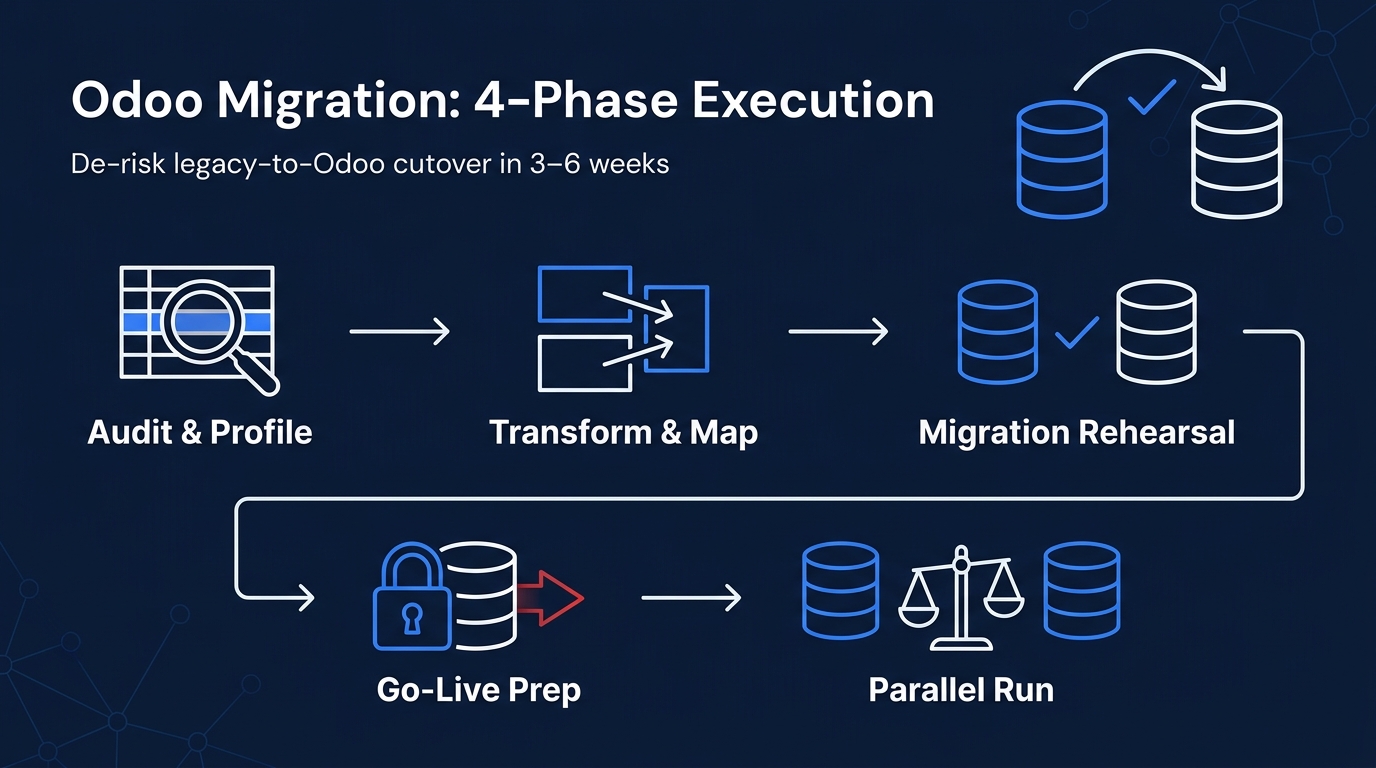
The Pre-Migration Technical Checklist
Building on the scoping decision above, the harder problem is execution discipline. Use this checklist to structure the four weeks before go-live:
Phase 1: Audit and Profile (Weeks 1-2)
Export a full data dictionary from your legacy system. Document every table, field, and data type.
Run a record-count audit: customers, vendors, products, open transactions.
Identify fields with no direct equivalent in Odoo's standard modules.
Flag duplicate records (customer/vendor deduplication is the most time-consuming step in most migrations).
Confirm data ownership: who in the business is accountable for validating each data domain?
Phase 2: Transform and Map (Weeks 2-3)
Build a field-mapping document: legacy field > Odoo field > transformation rule.
Apply cleansing rules: normalize date formats, currency codes, country codes, and unit-of-measure values.
Resolve duplicates using a defined merge rule, not ad hoc judgment.
Validate transformed data against your legacy system's known totals (customer count, product count, inventory value).
Phase 3: Migration Rehearsal (Week 3)
Run a full migration into a staging Odoo environment, not a sample
Execute a structured test script covering: customer invoice lookup, stock valuation report, open PO list, and bank reconciliation opening balance.
Document every discrepancy. Classify each as a data error, a mapping error, or a configuration error. The classification determines the fix.
Run a second rehearsal after fixes are applied. Two rehearsals minimum before go-live
Phase 4: Go-Live Preparation (Week 4)
Freeze legacy system for new transactions 24-48 hours before cutover.
Run the final migration from a confirmed clean export of the frozen legacy data.
Verify opening balances in Odoo against your legacy system's closing report.
Confirm your rollback procedure is documented and the team has rehearsed it.
Activate the new system during a low-transaction window (weekend or month-start).
How Do You Handle Custom Fields and Legacy Integrations?
Stepping back from the data checklist, a separate concern is the technical complexity that custom legacy fields and third-party integrations introduce. Standard Odoo modules cover the vast majority of business data cleanly. The problem is the portion that does not map directly, where legacy field structures and custom configurations require additional transformation work before they can be imported into Odoo.
For custom fields, the options are:
- Native Odoo custom fields: simple, low-risk, built through the UI or a minimal Python module.
- Odoo Studio customization: appropriate for UI adjustments and workflow rules without deep code changes.
- Custom Python modules: required when legacy business logic must be replicated exactly. These add testing overhead and must be maintained across Odoo version upgrades.
For legacy integrations (accounting software, WMS, logistics APIs), the migration phase is also the right moment to redesign integration architecture. Carrying legacy API dependencies into Odoo without reviewing them is a common source of post-go-live instability.
Frequently Asked Questions
How long does an Odoo migration from a legacy system take for a mid-market company?
For a scoped data set with moderate complexity, expect 3 to 6 weeks. Larger multi-entity environments take longer depending on data volume and cleansing requirements.
What is the biggest risk in an Odoo data migration?
Silent data errors during transformation. Incorrect field mapping can produce records that appear valid in the system but carry wrong values. This is why two full rehearsals before go-live are necessary.
Do we need to migrate all historical data?
No. Migrating only what Odoo needs to operate on day one significantly reduces risk and timeline. Archive the rest in a queryable read-only system.
What compliance requirements apply when migrating business data to Odoo?
At minimum, your implementation partner should hold ISO 27001:2022 certification, and your data handling during migration should align with GDPR if you operate in or serve European markets. Confirm these before any production data leaves your environment.
What should we look for in an Odoo implementation partner for this kind of migration?
Certified Odoo experience, a documented migration methodology, named references in your industry, and security certifications (ISO 27001:2022, SOC 2 Type II). The partner's ability to staff senior engineers quickly matters too: a 2-4 week ramp from 1 to 10+ engineers can mean the difference between hitting and missing your go-live window.
Can we run Odoo alongside our legacy system during transition?
Yes. A parallel-run period, typically 2 to 4 weeks, where both systems are active and outputs are reconciled daily, is the most reliable way to validate migration accuracy before full cutover.
What happens if the migration fails at go-live?
Your rollback plan executes. This means your legacy system must remain operational and your final pre-migration export must be retained intact. Never decommission the legacy system until Odoo has operated in production for at least one full billing cycle.
About 724SOFTWARE
724SOFTWARE is a Vietnam-based technology company and a Top 5 Odoo service partner in Vietnam, with 200+ professionals and 58% senior-level experts. The team has delivered Odoo ERP implementations and data migrations across retail, distribution, manufacturing, and F&B sectors in Southeast Asia, covering everything from initial scoping to post-go-live support.
Holding ISO 9001, ISO 27001:2022, SOC 2 Type II, and GDPR compliance certifications, 724SOFTWARE operates as a long-term technology partner rather than a transactional implementation shop, with a 95% client retention rate and a guaranteed incident response time under 10 minutes. As an official partner with Claude (Anthropic) and Cursor, the team also applies practical AI tooling to accelerate migration scripting, data validation, and documentation by approximately 30%.
If your company is planning an Odoo migration from a legacy system and needs an experienced, certified Odoo implementation partner to reduce risk and protect your go-live window, visit https://724software.com.vn to start the conversation.